Display all of your sponsors with Q-Play
Display all of your sponsors with Q-Play
Whether you are a theater or a sports club you probably have several companies sponsoring your activities. Displaying their logos is most likely part of your deal with them, but the hassle of where and how to put up their logos can be very annoying.
Table of Contents
How does it work?
With Q-Play you get access to an online platform where you can display pictures, videos, text, and much more on digital screens hanging all around your venue, sports club, theater, etc.
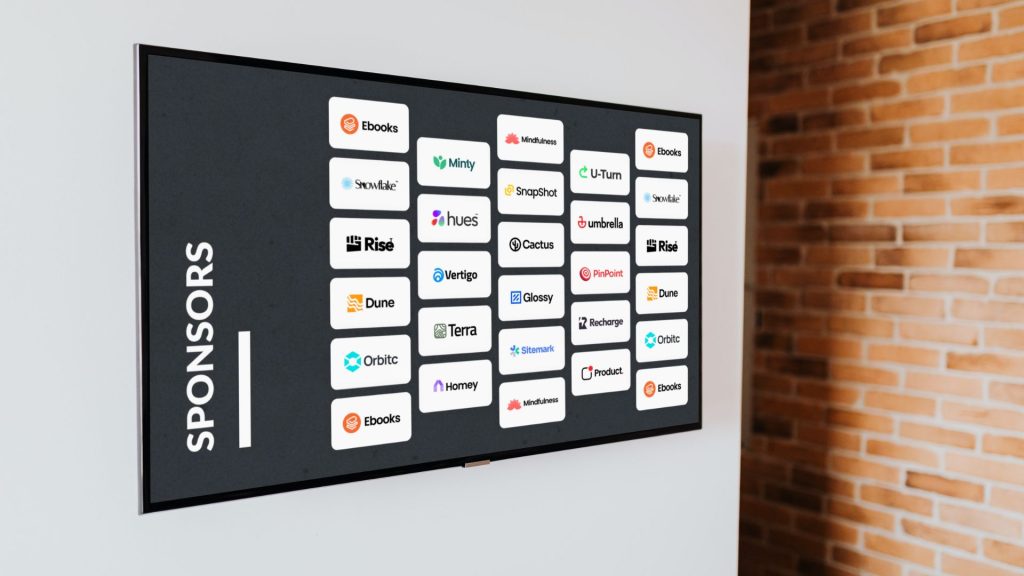
In the Q-Play platform, you just upload the logos of all your sponsors and use them and the Q-Play Editor to create an awesome-looking design. You can either display all of the logos at once or have them pop onto the screen one at a time. – It is all up to you.
Designing a digital signage solution in Q-Play is very much like creating a PowerPoint. By Drag ‘n Drop of apps, you create a design that helps you display all of your sponsors in a modern and digital way.
When you have created your design, you are ready to display it on an external screen of your choice.
Why have it?
Why use a cloud-based digital signage solution to display your sponsors? – Because it is smart, and it will save you time and money.
When using Q-Play to display your sponsors, you no longer have to spend time setting up banners or posters of your sponsors’ logos. You don’t have to walk around to every bulletin board putting up new papers.
With digital screens hanging where most people pass them, you can put up all of your sponsors’ logos at once from your computer. Thereby saving time on not having to walk all around the place to replace posters on the walls.
You will probably also save some money. We imagine that those sponsored posters are quite expensive. With Q-Play, you only need a digital picture.
How to get Started?
To get started with your digital display of sponsors you only need 5 things – Yeah it sounds like a lot, but have a look anyway!
- A digital Screen (preferably a screen manufactured for signage solutions)
- A media player
- Q-Play subscription
- Sponsor logo
- Internet
So first of all you need to decide what screen you want to use. Do you already have a screen you can use or are you looking for new screens with Q-Play pre-installed?
When you know that then it is time to decide what type of media player you want to use. We have a vast variety of players for you to choose from and the most important thing is that you choose the hardware or software solution that fits your needs.
Now you need your Q-Play subscription. You can either give us a call and we’ll set it up for you, or you can create your free account and order your subscription online under PlayControl.
The sponsor logo and internet connection we can’t really help you with, but knowing the world we live in today, you probably have those already.
You can read all about the actual setup of the media player, how to connect your screen to Q-Play and your design to your screen in our online HelpCenter or you can book a free demo of Q-Play from one of our team members. That is all up to you.
A Professional and Awesome Design?
If you want the design of your sponsor display to be created by a professional our graphic designers are ready to help you create the perfect design. With a professional design, you get a sponsor display, that is not only going to make all of your sponsors happy, but also make your company seem modern and very stylish.
To sum up …
So to sum it up. With Q-Play you get an online platform that makes it possible for you to sit by your computer in the comfort of your own home and upload new sponsor logos to all of the screens at your venue, sports club, theater, etc.
This will save you both time and money because you remove the manual process of putting posters up and taking them down again. It also gives you a more digital and modern look, and no, it doesn’t have to cost a fortune.

.png)