
00:00
/
00:00
This release lets you preview what a player shows at any chosen time, export a full overview of user access, and makes working with integrations faster and more reliable.
- Player preview at a specific time. You can now preview a player's content for a chosen date and time, so you can check scheduled content before it goes live.
- Export user rights. You can now export user rights to a spreadsheet showing each user's access to presentations, playlists, folders and more, which makes access reviews much easier.
- Login details on your profile. Your profile page now shows your login method, including SSO, and which account manages your profile.
- Teams in alphabetical order. Teams are now listed alphabetically when you edit a user's team permissions.
- Clear button in search fields. Search fields now have a clear button, so you can reset a search in one click.
- Usage count for apps and integrations. The developer section now shows how many presentations and playlists each app and integration is used in.
- Faster integrations. Integrations with many jobs now load much faster.
- Safer job runs. While a job is running, it can no longer be edited or started again, which prevents accidental duplicate runs.
00:00
/
00:00
Q-Play on BrightSign: Purpose-Built Reliability for Digital Signage at Scale
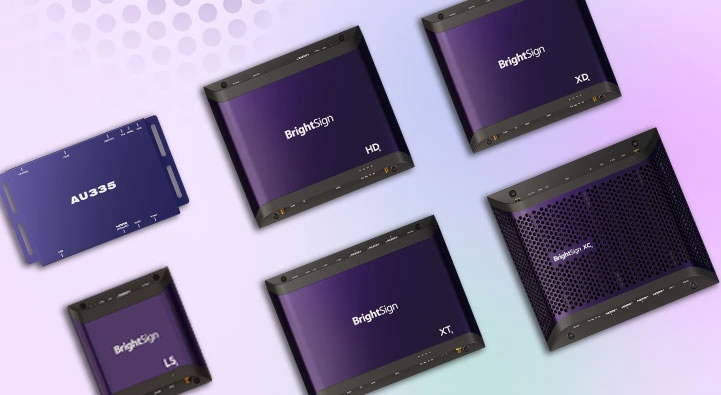
Q-Play delivers rock-solid performance on BrightSign media players, the industry standard trusted by more digital signage deployments worldwide than any other platform. With full support across the BrightSign LS and HD series, including the latest 2025-26 generation, you get dedicated, purpose-built hardware engineered for one job: running your content flawlessly, 24/7.
Transform Any Display with Q-Play + BrightSign
Unlike embedded smart-display platforms, BrightSign players aren't tied to a single screen manufacturer. Pair Q-Play with a BrightSign player and deploy world-class signage on virtually any commercial or consumer display — giving IT and AV teams the freedom to standardize on one media player platform across mixed-display estates, free of vendor lock-in.
BrightSign's dedicated OS means fewer background processes competing for resources, a smaller attack surface, and the uptime that's made BrightSign the default choice for mission-critical signage in retail, QSR, transportation, and corporate environments. Fewer failure points mean lower total cost of ownership — through reduced truck rolls and support tickets, not just fewer boxes.
Whether you're running office communications, retail promotions, or hospitality displays, Q-Play on BrightSign delivers enterprise-grade reliability with the flexibility to scale across any venue and any screen.
Key Features of Q-Play on BrightSign
- Full support for BrightSign LS and HD series, including the current 2025-26 generation
- Purpose-built playback hardware — dedicated silicon and firmware designed exclusively for digital signage
- Industry-leading reliability and uptime, backed by BrightSign's track record in mission-critical environments
- Streamlined cloud-based content management, consistent across all supported hardware
Why BrightSign + Q-Play is Built for Scale
BrightSign is the most trusted name in dedicated digital signage media players, deployed where downtime isn't an option. Q-Play taps into this global installed base and BrightSign's extensive partner network, pairing proven, purpose-built hardware with Q-Play's content management — flexible for single-site rollouts and robust for multi-thousand-screen networks.

00:00
/
00:00
Nordicscreen is now certified to ISO 27001:2022, the international standard for information security management. The certification was issued following an independent audit and is subject to ongoing surveillance.
For you as a customer, it means security is something we can document rather than something we simply claim. We operate a management system with defined requirements for risk assessment, access control, incident handling, supplier management and business continuity. Every process is written down, assigned an owner and reviewed by a third party.
This matters because digital signage rarely stands alone. Displays sit in stores, receptions, canteens and schools, connected to your network and often to your data. A signage vendor deserves the same scrutiny as any other IT supplier.
Certification makes that assessment easier:
- Fewer questionnaires. Our certification covers a large share of the security requirements that typically come up in procurement and public tenders.
- Faster sign-off from your IT department or security officer.
- A documented basis for your own GDPR and NIS2 work, where supplier management carries real weight.
We are among the few vendors in the digital signage industry to hold ISO 27001:2022. We pursued it because our customers increasingly ask for genuine evidence rather than statements of intent.
If you would like to know more about the scope of the certification, or need our documentation for a vendor assessment, get in touch.
00:00
/
00:00

This release speeds up working with media in the Q-Play editor, makes swapping images and videos a single click, and gives you a full overview of how your content is connected.
- Faster media library. The media library now opens noticeably faster when you add or change media in an Image or Video app.
- One-click media swap. Clicking the selected media in an Image or Video app takes you straight to the media library, so replacing content is one click instead of several steps.
- Content relations everywhere. Players, presentations, playlists, slides and events now show their relations in both list and card view. From a playlist you can see which presentations, players, events and integrations use it — and open any of them directly in a new tab.
- Preview at a specific time. You can now pick a date and time when previewing a presentation or playlist, so you can check exactly what will be on screen at 22:00 tonight without waiting for it.
00:00
/
00:00
This update adds practical safeguards that make it harder to break things by accident, gives you more control over when and how your screens run, and adds clearer visual cues so you always know how a player or presentation is set up.
- Turn screens on and off — or schedule them — directly from the player, making it far easier to control when a display is active.
- Set a default background colour at account level, so new slides no longer default to white. Ideal for retail content that fades between videos and images without white flashes.
- Player screenshots now visualise rotation and aspect ratio, and the screenshot itself rotates to match the player's configured orientation — so you can tell at a glance how a screen is set up.
- Presentations now display their aspect ratio and pixel dimensions, both in the presentation overview and at the top of the editor.
- Players with no active content now show a clear warning icon across the player, list, and card views, so empty screens are easy to spot.
- Bulk actions such as restarting, clearing cache, or reloading content now ask for confirmation before running, preventing accidental changes across all your players at once.
- Playlists attached to a design can no longer be deleted without a warning, matching how designs and players are already protected.
00:00
/
00:00
This update brings a batch of practical improvements to the Q-Play Media Library, making it faster to organize and safer to manage your content, along with clearer visual cues across the editor and a fix to event management.
Highlights include:
- Paste images directly into the Media Library with Ctrl+V, instead of uploading them manually.
- Move folders within the Media Library, and create new folders on the fly when uploading from the editor.
- See image and video resolution directly in the Media Library, without downloading files to check.
- Get a warning before uploading an extremely large image, helping you avoid files your players can't handle.
- Get a warning before deleting media that's still in use in a playlist or presentation, with a list of exactly where it's used.
- See metadata, presentations, events, and time schedules at a glance thanks to new icons on players and slides.
- Mass update the version of multiple selected players at once — the bulk action is back.
- Web players now come with a dedicated, shareable link, making setup and sharing simpler.
We've also fixed an issue that prevented events from being activated directly from the Event Management page, and made it clearer how to edit an integration job in the Q-Play Integration tool.
00:00
/
00:00
- App-controlled slide timing is now clearly indicated — when an app integration controls slide transitions, the slide duration setting now displays "Controlled by App" instead of a misleading timer value.
- Deep links across all content entries — you can now navigate directly between related items throughout Q-Play: from players to presentations, from presentations to playlists, and from event update sheets directly to the relevant presentation.
- Metadata usage overview — the metadata overview page now shows exactly which players, presentations, playlists, events, and integrations each metadata entry is used on, making it much easier to understand the impact before making changes.
- Media Library search now covers all files — searching in the Media Library now returns results across your entire file collection, not just the currently visible page.
- Editor shows media file name and details — when working in the presentation editor, media elements now display the file name and relevant details so you always know which asset you are working with.
- Editor performance significantly improved — slide loading times in the editor have been reduced, making the editing experience noticeably faster and more responsive.
- Cloned slides now include "(Copy)" in the name — duplicating a slide now follows the same naming convention as playlists, appending "(Copy)" to clearly distinguish the clone from the original.
- Screenshots open in a new tab — clicking a screenshot thumbnail on a presentation now opens the full image in a new browser tab for easier inspection.
- Screenshot timestamp now shows the correct time — a display bug causing screenshot capture times to show in AM/PM format instead of 24-hour time has been fixed.
- Margin guides now visible on dark backgrounds — margin indicators in the design tool are now readable regardless of the slide background colour, including dark and black backgrounds.
- List view column improvements — group name columns in Playlist, Presentation, and Player list views are now wider and show a tooltip on hover when names are truncated, making it easier to see full group names at a glance.
- App settings UI polished — the app settings panel has been redesigned for a cleaner and more consistent visual appearance.
- Direct player links in event editing — when updating an event, the player list now includes direct links to each individual player, saving navigation steps.
00:00
/
00:00
Q-Play has been updated – and you'll notice the difference
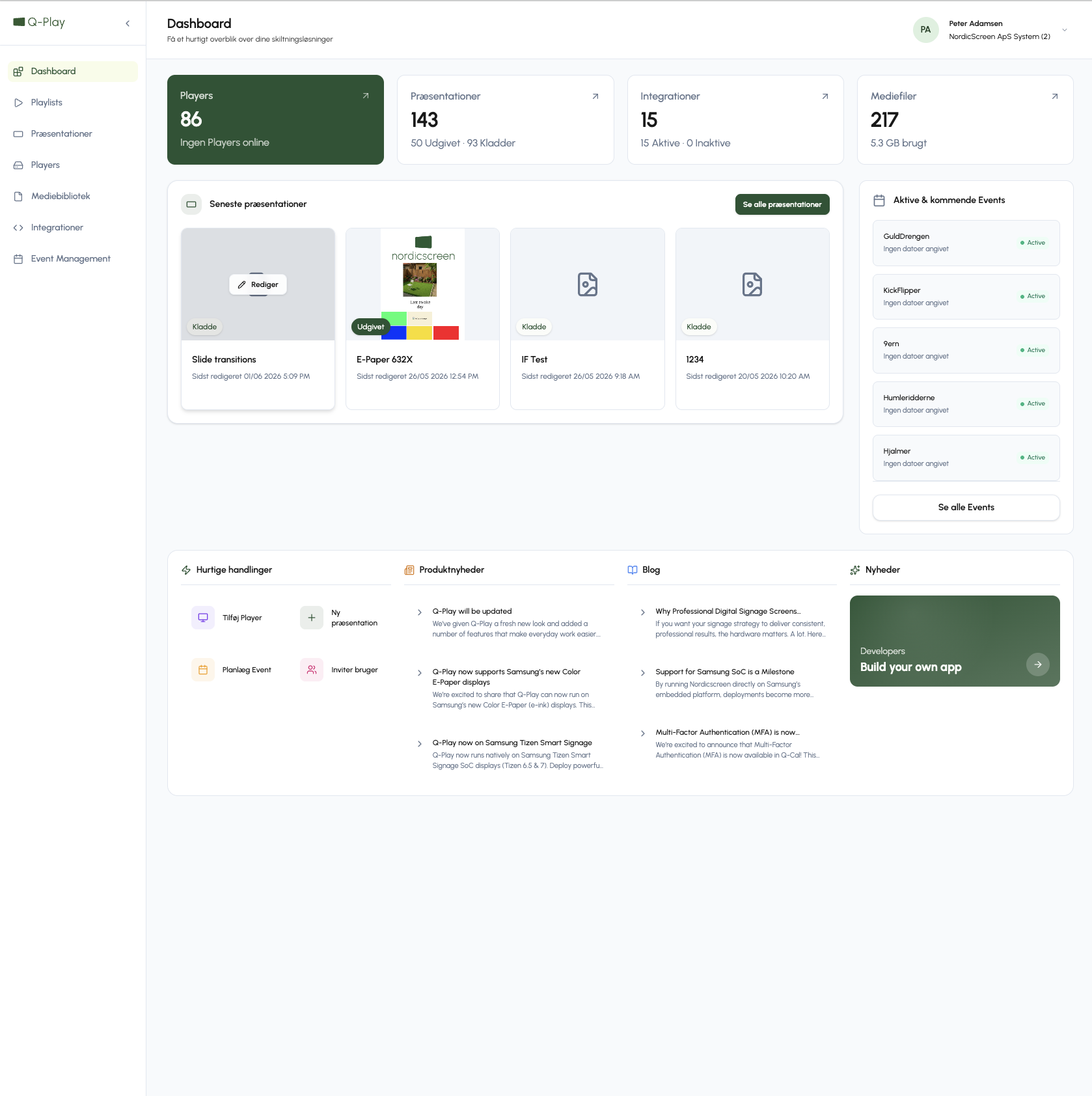
We've given Q-Play a fresh new look and added a number of features that make everyday work easier. Whether you're designing content from scratch, organising your playlists, or pushing new content live to your screens – it's now faster, more intuitive, and easier to navigate.
What's new
- Layers in the design tool – Manage elements in layers, making it easier to work with more complex designs.
- Snapping – Elements automatically align and maintain the right spacing – without you having to think about it.
- Margins – Add margins to your design and instantly achieve a more polished, consistent look.
- Improved filtering – Easily filter across apps, players, and playlists to quickly find what you're looking for.
- Faster to live – An updated workflow makes it easier to publish your design directly to your screens.
- Search everywhere – Search across apps, playlists, and players – and find what you need in seconds.
See it in action
Watch a full walkthrough of the new Q-Play here:
Frequently asked questions:
Do I need to do anything? No – the update is automatic. Your existing designs, playlists, and settings are completely unchanged.
What happened to my existing designs? Nothing is lost. All your designs and playlists remain exactly as they were – you'll simply experience them in the new, improved interface.
What is snapping? Snapping means that elements in the design tool automatically align with each other at the correct spacing. It saves time and creates a more consistent result – without any manual adjustments.
I can't find a feature I normally use – what do I do? The new interface has reorganised some menus. Try using the search function at the top of the navigation. If you still can't find what you're looking for, please don't hesitate to contact NordicScreen support.
Where can I learn more about the new features? Watch the video walkthrough via the link above – it covers all the key updates. You're also always welcome to reach out to us directly.

00:00
/
00:00
We’re excited to share that Q‑Play can now run on Samsung’s new Color E‑Paper (e‑ink) displays. This opens up new possibilities for ultra‑low‑energy consumption digital signage.
Samsung Color E‑Paper combines the look of traditional printed posters with the flexibility of digital signage, consuming near‑zero power.
By enabling Q‑Play on these devices, we’re proud to be among the first digital signage software providers in Europe to support Samsung’s e‑paper displays. This means businesses can now manage e‑paper signage centrally, update content remotely, and integrate it into an existing Q‑Play signage setup.
Why Q‑Play + Samsung Color E‑Paper?
- Extremely low energy consumption
Ideal for sustainability‑focused deployments and locations with limited power access.
- Paper‑like readability
Excellent visibility in bright environments, with no glare.
- Centralized content management
Update, schedule, and control e‑paper screens through Q‑Play.
- Perfect for static content.
Menus, price lists, wayfinding, opening hours, promotions, and informational signage.
Designed for real‑world use cases
E‑paper signage with Q‑Play is especially well suited for:
- Retail and in‑store communication
- Hospitality menus and info boards
- Offices and corporate communication
- Museums, public buildings, and education
- Environments where sustainability and power consumption matter
👉 Book a demo or contact us to learn more about Q‑Play on Samsung Color E‑Paper
00:00
/
00:00
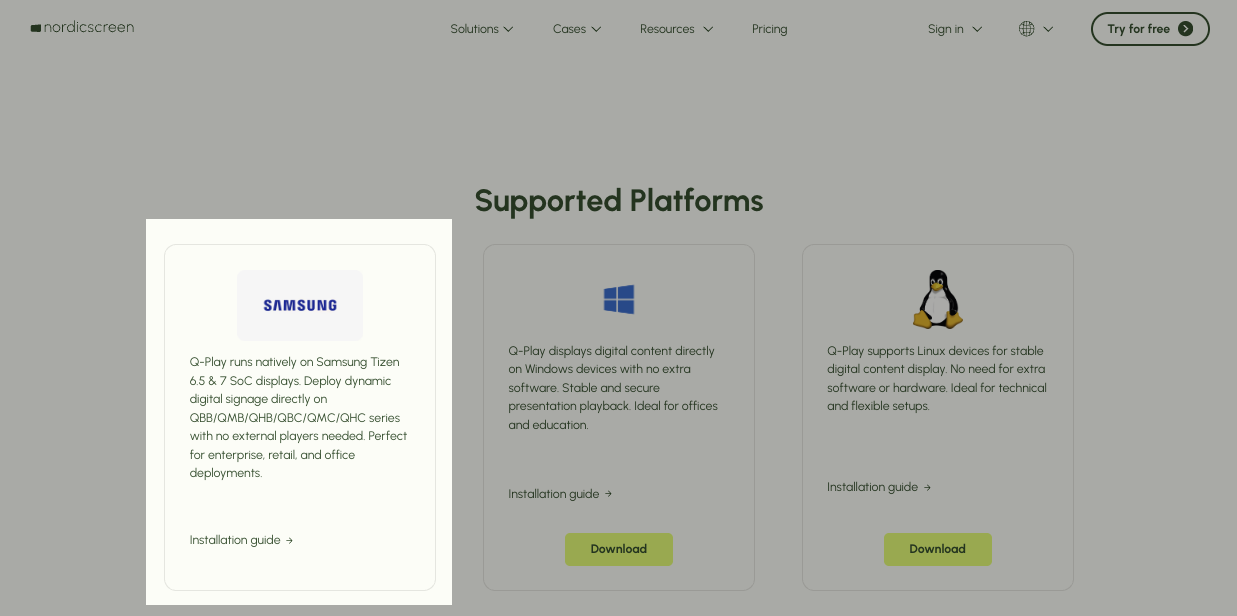
Q-Play now delivers seamless, native performance on Samsung's embedded Tizen SoC displays running Tizen 6.5 and 7.0. This breakthrough means you can deploy powerful, professional digital signage across Samsung Smart Signage models like QBB, QMB, QHB, QBC, QMC, and QHC series without the need for external media players or additional hardware.
Transform Your Samsung Displays with Q-Play
With Q-Play's native Tizen support, your Samsung Smart Signage displays unlock their full potential. Run dynamic content, real-time updates, and sophisticated digital signage workflows directly on the built-in SoC player. IT and AV teams benefit from streamlined setup that matches existing Samsung deployment processes, making large-scale rollouts faster and more reliable.
This integration delivers lower total cost of ownership by eliminating separate media players, simplifying installation, and reducing maintenance overhead. Whether you're managing office communications, retail promotions, or hospitality information displays, Q-Play powers it all where your screens already are.
Key Features of Q-Play on Samsung Tizen
- Native support for Tizen 6.5 (SSSP10: QBB, QMB, QHB series) and Tizen 7.0 (QBC, QMC, QHC series)
- Full playback on Samsung's embedded SoC. No external hardware required
- Streamlined cloud-based content management
- Future-ready architecture leveraging Samsung's Tizen platform
Why Samsung Tizen + Q-Play is Perfect for Scale
Samsung leads the global digital signage market with over 30% share and 15 years at #1, powering millions of displays worldwide. Q-Play taps into this worldwide ecosystem used by partners all over the world, delivering compatibility and scalability for enterprise deployments.
00:00
/
00:00
New Security Feature: MFA Now Supported in Q-Cal!
We’re excited to announce that Multi-Factor Authentication (MFA) is now available in Q-Cal! This upgrade adds an extra layer of security to your scheduling and calendar management, ensuring your data and access remain protected.
Why MFA?
Security is critical, and MFA helps safeguard your account by requiring multiple verification steps. Even if your password is compromised, MFA keeps your account secure.
What’s Included?
- Enhanced Protection: Industry-standard authentication for your Q-Cal account.
- Simple Setup: Enable MFA easily in your account settings.
- Peace of Mind: Reduce the risk of unauthorized access.
Get Started Today
Activate MFA now and enjoy a more secure Q-Cal experience. For setup instructions, visit our [Help Center] or reach out to our support team.
00:00
/
00:00
We are pleased to announce that Nordicscreen now fully supports LG WebOS 8. This update ensures compatibility with LG’s newest lineup of professional signage screens, including the UH5Q series and upcoming generations based on the same software platform. As these screens reach the market, Nordicscreen is tested and ready.
Alongside WebOS 8, we have strengthened our SoC support. Nordicscreen has supported LG SoC players for some time, but with the latest update it is now a complete and fully refined experience. The internal player inside the screen handles everything, offering smoother performance, better stability and improved diagnostics.
What This Means For You
Full compatibility with LG WebOS 8
Nordicscreen runs seamlessly on the newest LG screen platform. This prepares your signage setup for the current and future WebOS 8 models entering the market.
SoC support that is now fully developed
Our SoC integration is no longer just compatible. It is now fully built out, giving you better performance, better reliability and a more predictable setup on LG’s internal player.
No external media player required
With the fully developed SoC support, the screen itself is all you need. This simplifies installation and reduces the number of devices you depend on.
More stability through deeper diagnostics
From version 1.3.5 and onward, Nordicscreen receives more detailed system data from LG devices. This helps us support you more effectively and contributes to smoother long‑term operation.
Ready for the latest LG hardware
The UH5Q series and future WebOS 8 screens are already supported, so you can deploy or upgrade with confidence.
😕 We couldn't found a match for "Nordic"