Essential hardware features for meeting room displays

Meeting room displays come with many features aimed at creating an optimal user experience, that ultimately makes the user’s life easier.

Essential hardware features for meeting room displays

– Guest blog by ProDVX

A complete meeting room display solution combines both meeting room software and a physical meeting room display. The physical features of this display, therefore, have a large impact on what you can do with it. Much like NordicScreen does with their software, we at ProDVX also make sure that the hardware we design and produce has features that make your life easier. In this blog, we will outline some of the features that benefit you the most.

Table of Contents

Durability of the hardware

For your meeting room display solution, you definitely do not want hardware that is prone to failure, as that becomes problematic. Your hardware should be always on, and ready to do its job. That is why our devices are made to last and produced with components from the world’s most trusted brands. It has even become one of our focus points, to provide you with the hardware you can always rely on, and we have the RMA rate to show for it too! All so you don’t have to deal with the hassle of hardware downtime.

In the end, there are always going to be some devices that experience issues, but for those, there is a standard warranty of 3 years – with the option to extend to 5 years – to help you out. This way, even if you encounter an issue with a device, you will have it back up and running in no time at all.

LED bars on Panel PCs

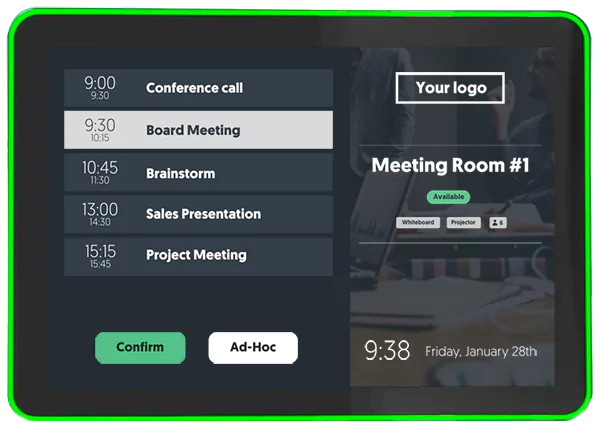
Finding yourself a meeting room can sometimes be quite a hassle. But you can make your life a lot easier by using a meeting room display that comes with a surround LED bar. The APPC-10SLB Android Panel PC comes with individually controllable LEDs along the edges. These allow you to see if the meeting room is available from miles away due to the red or green signaling. Never deal with people randomly walking into your meeting ever again.

And if the traditional red and green combination isn’t much of your thing, why not try another color combination? The 52 LEDs are individually controllable and can show any color you like, so let your creativity have its way!

A Panel PC with Power over Ethernet

You most likely don’t like messy cables lying all over the place, which is why ProDVX devices can be powered through Power over Ethernet (PoE). The big advantage of PoE over traditional power supplies is the fact that Power over Ethernet combines both data and power into one cable. With conventional methods, you would use a power supply in combination with either Wi-Fi or a

separate ethernet cable. Combining all of this into one cable makes your cable management much easier, and installing PoE is both more cost-effective and easier than traditional power outlets.

Lastly, with Power over Ethernet, you get a direct internet connection, which is inherently more stable than a wireless one. In practice, this means you won’t have to worry about internet disconnections anymore.

Are you curious about more? Get in touch with NordicScreen to find out more about the total solution

of Q-Cal Meeting Room Software and ProDVX Panel PCs.
More insights from Nordicscreen
Get tips, product updates, and inspiration for smarter digital communication.

Multi-Factor Authentication (MFA) is now available in Q-Cal

We’re excited to announce that Multi-Factor Authentication (MFA) is now available in Q-Cal! This upgrade adds an extra layer of security to your scheduling and calendar management, ensuring your data and access remain protected.

Solution heading
Product News

Q-Play Now Fully Supports LG WebOS 8 and Enhanced SoC Playback

Nordicscreen now offers full support for LG WebOS 8, making us ready for the newest generation of LG signage displays. At the same time, our existing support for LG’s built‑in System on Chip (SoC) players has been expanded and is now fully developed, giving you a stable and streamlined way to run Nordicscreen without external hardware.

Solution heading
Product News

Netværkshuset N1 – Creating a Seamless Guest and Meeting Experience

Netværkshuset N1 is a dynamic business hub hosting multiple companies under one roof. With so many organizations sharing the same space, ensuring guests feel welcome and find the right destination can be challenging.

Solution heading
Coworking space

Show availability of Clever charging stations

With our new integration of the Clever App you can show a live availability of your chargers on your digital signage

Solution heading
Clever Charging

How to Comply with the NIS2 Directive: A Step-by-Step Guide for Businesses

Navigate the NIS2 Directive, and Learn how NordicScreen's visitor management solutions can streamline your compliance efforts.

Solution heading
NIS2 Directive

Enhance Visitor Management with NordicScreen's Mobile Check-In

Discover NordicScreen's Mobile Check-In via QR Code – the visitor management solution designed for efficiency and convenience.

Solution heading
Mobile check-in

Combine i3-Technologies and Q-Play

By combining your i3-technologies and digital signage solution you can create a more engaging and efficient learning environment.

Solution heading
Digital signage

15 Reasons Why You Should Use Digital Signage

Read our 15 reasons why you should use digital signage in your business and see if you are ready to come and join the digital signage club.

Solution heading
Corporate communication

How to Digitize Your Theater’s Gallery Wall

As e.g. a theater, music theater or movies you are no stranger to the hassle of keeping your gallery wall of posters from current events up to date.

Solution heading
For theater’s

Digital Signage for your Store

Showcase product videos, special offers, and more with a digital signage solution. Cloud-based management for easy campaign control.

Solution heading
Signage for stores

Display all of your sponsors with Q-Play

Whether you are a theater or a sports club you probably have several companies sponsoring your activities.

Solution heading
Display sponsors

Automate the Sharing of Your KPI Dashboards

Read all about how to use Q-Play to share your KPI dashboards. Now you can easily visually display the relevant KPIs all over your company.

Solution heading
Show KPI dashboards